
Path of Idle Stats & Affixes: Damage, Attack & Tenacity
Understand what current tooltips can prove about Elemental and Physical Attack or Damage, Health Tenacity, equipment affixes, and safe build tests.
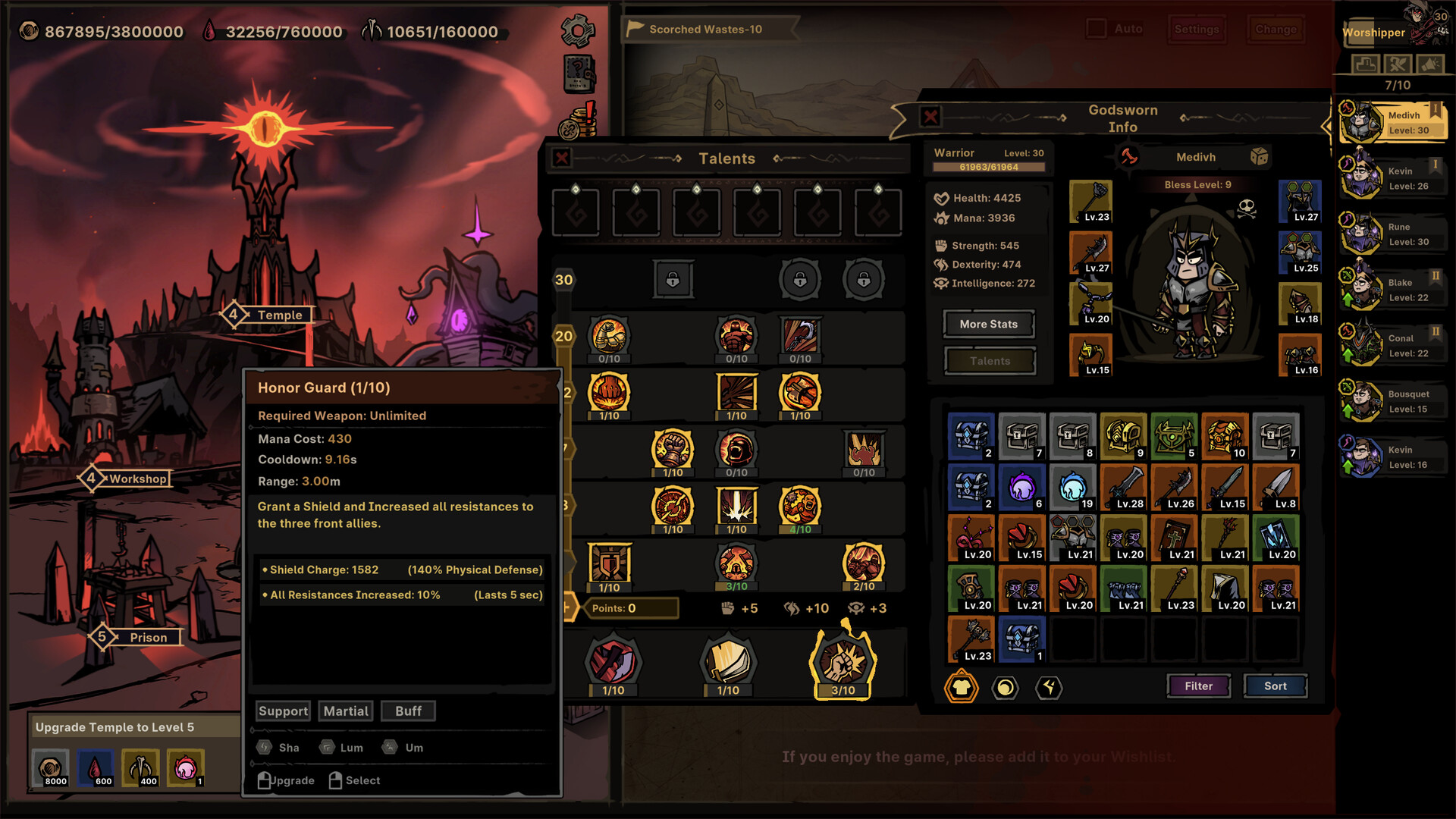
The visible tooltip is the starting point: it exposes requirements, range, cost, cooldown, effect text, and displayed scaling without requiring a guessed formula.
Credit: Official Path of Idle Steam store screenshot ↗
Version note: Official store media illustrates where to read a skill. Use the current 1.0.13 tooltip for live coefficients and wording.
Quick Answer
- ✓Start with the skill tooltip: check weapon requirement, range, cost, cooldown, tags, and the scaling text the current build actually displays.
- ✓Compare one change on the same stage and record clear time, first death, failure pattern, and combat statistics.
- ✓Patch 1.0.13 Grade bonuses are fixed at +0%, +20%, or +35%, but Grade still does not prove build fit.
Step 1: Define the Job Before Reading Numbers
Write one sentence for the Godsworn: hold the front, clear groups, damage a single target, heal, shield, buff, debuff, or supply another specific utility. A stat is useful only when it improves that job. This prevents a common error: replacing a working defensive or support effect because another item has a larger Total value. If the team fails because the front collapses, personal damage on a backliner may not address the failure.
Continue with: choose a role using the classes guide
Step 2: Read the Current Skill Tooltip in Order
Check the required weapon first, then mana or resource cost, cooldown, attack range, effect description, tags, and every displayed scaling line. A requirement can invalidate an otherwise attractive item. Range can move a character into danger. Cost and cooldown affect how often the effect appears. Tags help connect the skill to compatible effects, but this guide does not claim a tag changes damage unless the current tooltip or official note says so. Capture the tooltip before following an older build video because launch patches have corrected several descriptions.
Source: Official update feed — description and skill fixes ↗
Elemental Attack vs Elemental Damage: What Can Be Proven?
Players are currently asking whether Elemental Attack affects an entire hybrid skill or only its elemental portion, and how that differs from Elemental Damage, Physical Attack, and Physical Damage. The public 1.0.12 notes do not publish a complete rule for those labels, so this guide will not turn the wording into a formula. Open the current skill tooltip, record every damage component and scaling line, then compare one relevant affix at a time on the same target. If both physical and elemental values move, record that result for that skill and patch only; do not generalize it to every skill without another controlled test.
Health Tenacity: Use the Corrected Tooltip, Not an Old Definition
An early full-release update corrected the Health Tenacity description, which means an older screenshot or guide can present obsolete wording. Update the game, read the current tooltip verbatim, and test the stat against one repeatable survival failure while keeping team order, opponent, and other gear unchanged. Record first death and damage taken rather than assuming Health Tenacity is identical to Health, defense, resistance, or a universal percentage reduction. Public patch notes confirm the description correction but do not publish a complete formula.
Source: Official update feed — Health Tenacity description correction ↗
Equipment Grade Is a Proven Value Bonus, Not a Complete Build Score
Version 1.0.13 replaces within-range rolls for an Equipment item's main attribute and Affix values with three Grades. Normal gives a 0% bonus, Superior 20%, and Perfect 35%. Existing Equipment was upgraded into the new data structure. Those percentages are documented facts, but they do not prove that a Perfect item beats a lower-Grade item with the required weapon, useful Affixes, sockets, granted skill, or set bonus. Compare Grade only after checking role compatibility, and use the same controlled stage test before calling the swap an upgrade.
Continue with: use the Equipment Grade and filter workflow
Source: Official version 1.0.13 notes ↗
Step 3: Audit the Entire Equipment Package
Compare base attributes, ordinary affixes, rare or legendary effects, sockets, granted skills, and set bonuses. A higher Total does not show whether the useful lines match the role. Conversely, a lower-level item is not automatically better because it has one attractive effect. List which lines are expected to matter, which are defensive insurance, and which appear unrelated. If the relationship cannot be proven from the tooltip or a controlled test, label it unknown rather than counting it as damage.
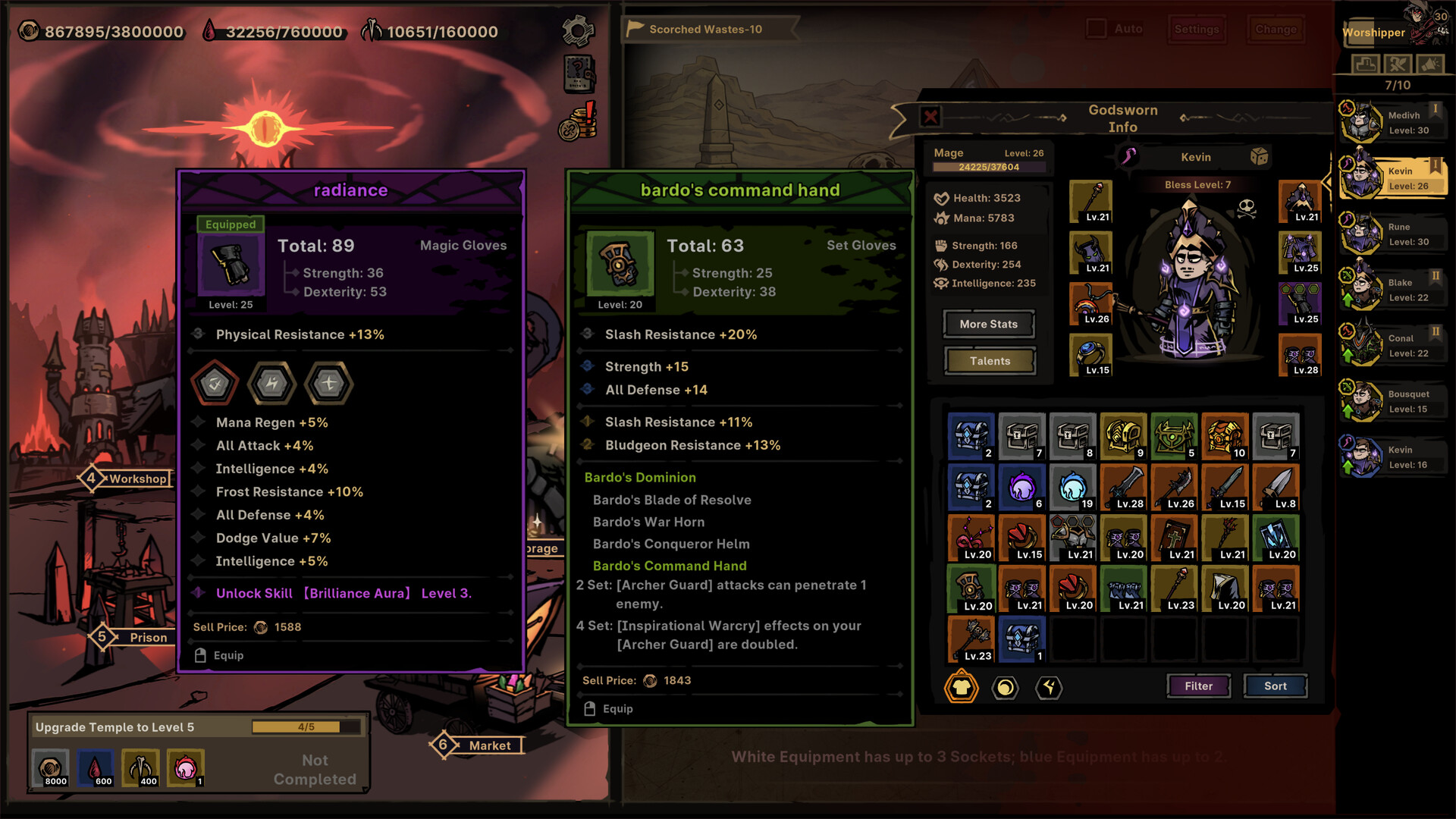
This comparison contains several independent decisions. Total score alone cannot express skill compatibility, sockets, or the value of completing a set.
Credit: Official Path of Idle Steam store screenshot ↗
Version note: The screenshot is evidence of interface structure, not current best-in-slot advice.
Step 4: Build a Repeatable Test
Use the same stage, team order, automation, and opponent. Record whether the run clears, the completion time shown by the game when available, who dies first, whether the failure is damage or survival, and the relevant combat-stat values. Change one item, Talent, skill, or team slot—not all four. Repeat enough times to avoid treating one unusually favorable attempt as proof. Patch 1.0.9 changed combat-stat number formatting to KMBT display; that is a presentation change, so compare like with like rather than assuming the underlying value changed.
Source: Official version 1.0.9 update ↗
Step 5: Classify the Result
Keep the change when it repeatedly improves the defined job without creating a more serious failure elsewhere. Reject it when the displayed Total rises but the line clears more slowly, dies earlier, or loses a required utility. Mark it inconclusive when results vary or two variables changed together. An inconclusive result is not a reason to invent an explanation; return to the baseline and design a narrower comparison.
What the Official Patches Already Clarified
The launch updates corrected Health Tenacity and Frost Damage descriptions, added missing Mastery Skill Speed text, improved equipment comparisons to show Affix changes, fixed some incorrect base Affixes and comparison displays, and fixed a Mythic equipment damage-stat display issue. Version 1.0.12 then fixed incorrect main-attribute ratios on some high-rarity equipment, clarified Fine, Rare, and Set Affix colors, and fixed the Affix configuration of Legendary Silver Sting. These records show why screenshots and spreadsheets from earlier builds can disagree with the current client. Update first, then rebuild the baseline before diagnosing a supposed scaling problem.
Source: Official update feed — versions 1.0.2, 1.0.5 and 1.0.6.2 ↗
Claims This Guide Deliberately Withholds
Public evidence reviewed for this page does not establish a complete dual-weapon formula, every additive and multiplicative damage bucket, hidden proc rates, or a permanent class stat priority. Those topics require current retail data or a controlled demonstration that exposes the relevant variables. Until then, the installed tooltip and repeatable stage test are safer than a precise-looking but unsupported formula.
Related Guides
Evidence Sources
- Official version 1.0.13 Equipment Grade rules ↗
- Official Steam store and screenshots ↗
- Official Path of Idle update feed ↗
- Official version 1.0.12 announcement ↗
- Current Steam discussions: Affix question ↗
- Steam player feedback: missing effect and passive-skill performance detail ↗
- Steam review feed: player questions about weapons, scaling and opaque stats ↗
Revision note: checked against the sources above on 2026-09-13. Recheck in-game tooltips after every balance update.