Path of Idle: Old Gods Rising Town Building Guide
A patch 1.1.2 guide to Workshop Base Affix upgrades, Market socket and Grade upgrades, Training Grounds, buyback, Warehouse, Vault, Orders, and forging.
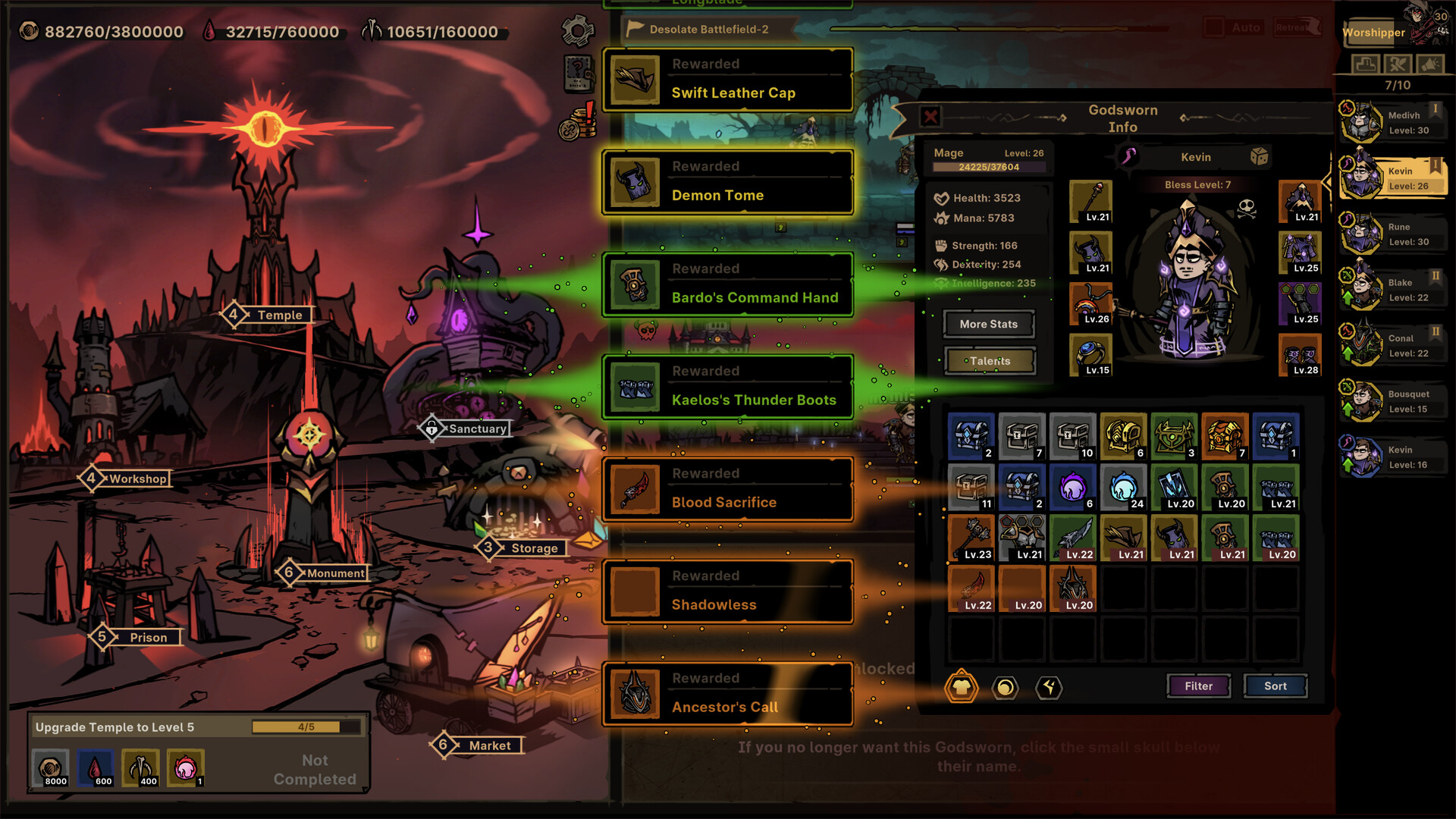
The town overview makes the bottleneck method concrete: invest in the building tied to the problem you can currently name.
Credit: Official Path of Idle Steam store screenshot ↗
Version note: Use the current client for renovation costs and unlock requirements.
Quick Answer
- ✓Training Grounds unlocks after Chapter 8 and supports a chosen Dummy Level with one to six targets.
- ✓Sold equipment can be bought back at the sell price until a Market refresh removes it permanently.
- ✓Expand Warehouse or Vault before enabling automation that may replace items.
Workshop, Market, and Vault Upgrades in Patch 1.1.2
A new Workshop upgrade raises Base Affix Level by one for every 10 Forging levels, up to +3. Market upgrades can raise the chance that Common equipment has three sockets and that equipment appearing in the Vault has Perfect Grade. Another Market upgrade keeps Fine Affix levels from falling below 2, 4, or 6. The official note does not publish costs, exact chances, which upgrade tier maps to each minimum, or a universal purchase order. Buy the upgrade that addresses a proven gear bottleneck, then compare the same item or farming cycle before spending again.
Continue with: compare Grade, sockets, and Affixes safelyread the full 1.1.2 evidence boundary
Training Grounds and Market Buyback in Patch 1.1.1
Training Grounds dummy practice unlocks after clearing Chapter 8. You can set Dummy Level and choose one to six dummy targets, which creates a controlled place to compare one build change at a time. The official note does not describe a menu path, dummy defenses, a damage meter, rewards, or a universally best target count. Market sell-only slots are removed and merged with buy slots. Equipment you sell appears in the trade slots and can be bought back at the sell price, but refreshing the Market removes that equipment and makes recovery impossible. Review every accidental sale before pressing refresh.
Continue with: compare team changes with a controlled baselinereview current inventory and automation filters
Source: Official version 1.1.1 notes ↗
Agony Scales, Inspire, and Forging in Patch 1.0.13
Market Order stage completion now rewards Agony Scales rather than Abyssal Scales. The returned resource is still combined from Abyssal Scales and increases Item Level by one, with a maximum limited by chapter. After updating, the game compensates five Abyssal Scales per completed Orders stage. In the Temple, one Inspire now grants all Masteries and old Baptism upgrades become Lock Inspire Mastery upgrades. In the Workshop, forging upgrades an Affix at a fixed cadence of every five levels. These facts come from the official note; it does not publish exact Order unlock paths, chapter caps, Inspire odds, or which item should receive scarce materials first.
Continue with: plan Inspire and Mastery locks safelyreview Equipment Grade and Dark Star
Source: Official version 1.0.13 notes ↗
Market Orders and Warehouse Changes in Patch 1.0.12
Version 1.0.12 adds batch placement and batch delivery for Market Orders and improves category display in the Warehouse Vault. Use the batch actions to reduce repetitive clicks, then inspect the resulting inventory and currency state before expanding automation. The official note does not publish batch limits, eligibility rules, or a universal reason to complete every Order, so follow the current interface and the account's actual bottleneck.
Source: Official version 1.0.12 notes ↗
Warehouse Core Renovation After Patch 1.0.9
Warehouse Core Renovation no longer increases resource caps. The official 1.0.9 announcement says it now increases high-quality chest spawn rates during Adventure. Treat that as an Adventure-loot upgrade rather than a storage-cap solution. Gold, Blood, and Bone now use fixed very high caps, and offline overflow beyond a cap is discarded without blocking the rest of the claim.
Start With the Monument and Stele
The Monument is the game's built-in tutorial and reward track. Complete its current tasks before trying to optimize town buildings out of order; the Monument introduces storage, combat, recruitment, and crafting systems progressively. The Stele unlocks additional town renovations as you advance. Some building functions are gated behind Stele upgrades, so pushing Journey stages is not separate from town development—it is the prerequisite for it. If a building option appears grayed out, check whether the Monument or Stele requires the next unlock first.
Continue with: three-step Monument decision loop
Prison: Recruitment and Roster Quality
The Prison lets you Charm defeated enemies into Godsworn and refresh the available recruit list. Upgrade the Prison when recruit quality or access to a needed role is limiting your roster. Version 1.0.4 increased Legendary and Mythic Prisoner appearance chances, so later Prison levels can meaningfully change what is available. Prison automation was expanded in version 1.0.7, allowing automatic recruitment rules. Set those rules conservatively before long idle sessions: an unfamiliar Legendary or Mythic recruit with an unusual skill may be more valuable than its level suggests. Do not auto-sell or auto-dismiss recruits until you understand which skills and roles your current and future lines need.
Temple: Levels, Blessing, Talents, and Baptism
The Temple handles character progression. Upgrade it when levels, Blessing, Talents, Baptism, or Inspire are holding a proven character back. Version 1.0.5 changed Blessing to grant one Talent Point every five levels, up to six, with no random rolls. The developer instructed players to reset Talents after updating so the new points apply. Baptism rerolls Talents and can be shaped by Preferred Skills set in the Codex. Version 1.0.3 made Preferred Skills apply to Baptism, and version 1.0.4 extended them to Mutated Skills. Before Baptism, lock the Talents you cannot afford to lose and compare the result on the same test stage. A high-quality result that breaks the character's role is not automatically an upgrade.
Workshop: Equipment, Embedding, Forging, and Refining
The Workshop is the equipment improvement center. Its renovation tree unlocks functions such as Embedding (socketing runes), forging, refining, and affix handling. The developer confirmed that you must unlock or upgrade Embedding in the Workshop before socketing works; visible sockets on an item are not enough while the function is still locked. Upgrade the Workshop when equipment quality is the reason your active line cannot progress. Version 1.0.3 fixed Rare and Legendary Rune Pouches not being craftable in the Workshop. Version 1.0.3 also reduced high-level Forging costs by about 25%. Corrupting has provided only positive equipment outcomes since version 1.0.4. Forge only after a candidate item wins the full comparison with your current gear, because early materials are more valuable than a small upgrade on temporary equipment.
Warehouse and Vault: Storage and Automation Safety
Expand the Warehouse or Vault before automation begins deleting or replacing items you still need to inspect. Version 1.0.7 added Warehouse batch take-out and made a full Vault replace lower-level equipment automatically. Version 1.0.8 fixed left-click comparison switching in the Vault. A safe workflow is: reserve free space, protect Mythic, Legendary, set, socket-rich, and unfamiliar skill-granting items, run a short idle session, compare the protected group, then narrow the filter one category at a time. Never enable aggressive auto-filters before confirming you have enough space to preserve build-enabling drops.
Market: Purchasing, Auto-Buy, and Filters
The Market sells resources, equipment, and other items. Version 1.0.5 added Market filters for socket count and Auto-Buy, making it easier to target specific equipment properties. Version 1.0.7 expanded Market automation. Use Auto-Buy carefully: a filter that buys every socketed item may drain currency on low-level pieces while missing a better plain item that supports your current build. Start with a narrow filter, observe one complete cycle, check spending and inventory, then widen the rule if results are safe. The Market is most useful when you know exactly what material or property is missing, not as a general spending sink.
A Bottleneck-Driven Upgrade Order
There is no single building order that stays optimal for every account. Use this diagnostic instead: when progression stops, identify the single bottleneck. Poor recruit options point toward the Prison. Level or Baptism limits point toward the Temple. Weak gear points toward the Workshop. Storage pressure points toward the Warehouse or Vault. Missing materials point toward Exploration, Journey, or Market. Change one variable—one building upgrade, one recruit, one equipment piece—then retest the same stage. Only then make the next investment. This method prevents spreading resources across every visible system while the real limit remains unaddressed.
Renovation Materials and Exploration
Town renovations require materials gathered through Exploration and Journey. As you unlock additional combat lines, dedicate stable lines to gathering the exact material your next renovation needs. A line that cannot push further in Journey may still be perfectly capable of farming the specific resource for a Workshop or Temple upgrade. Move gathering lines to the correct Exploration stage for that material; version 1.0.7 added automatic Outlands plane switching and Exploration level settings to make this easier. Do not keep every line on Journey if some are stalled: rotate them to resource gathering until the renovation unlocks the next push.
Offline Rewards and Storage Planning
Version 1.0.8 reworked offline rewards: they now include additional resources and scale gradually with Worshiper level. The Supporter Pack offline-income bonus also activates when obtained. Before logging out, spend or make room for capped resources, reserve equipment storage, confirm the active gathering lines, and note the resource required for the next town upgrade. The 1.0.8 notes warned that resource-cap issues still needed a later fix, so do not rely on uncapped overflow. On return, check what hit a cap before assuming a low reward was an automation failure.
Continue with: offline rewards, caps, and automation guide
Common New-Player Mistakes
First, upgrading every building equally instead of targeting the current bottleneck. Second, enabling automation before understanding what the filter keeps and discards. Third, trying to socket runes before unlocking Workshop Embedding. Fourth, ignoring storage limits and losing build-enabling items to a full Vault. Fifth, copying a rigid upgrade order from an old demo video instead of adapting to the current account state. The remedy for all of these is the same: diagnose the single failure point, make one targeted change, retest, and only then decide the next step.
Related Guides
Evidence Sources
- Official version 1.1.2 Workshop, Market, and Vault upgrades ↗
- Official version 1.1.1 Training Grounds and Market changes ↗
- Official version 1.0.13 Market, Temple, and Workshop changes ↗
- Official version 1.0.12 Market and Warehouse changes ↗
- Official Steam store ↗
- Official update feed ↗
- Developer answer: equipment filter is in Inventory ↗
- Developer answer: unlock Workshop Embedding to socket items ↗
- SteamDB app history ↗
Revision note: checked against the sources above on 2026-09-22. Recheck in-game tooltips after every balance update.